


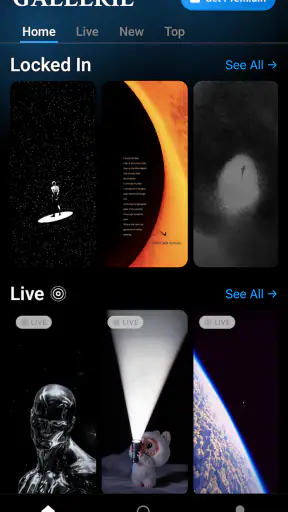

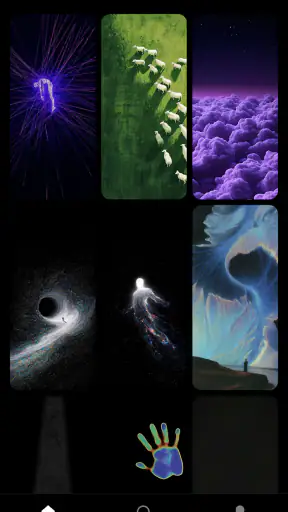


Changing a phone’s wallpaper sounds like a tiny decision, but it can quickly turn into a tiring search through low-quality images, repeated designs, and pages that are difficult to browse. Gallerie Wallpapers takes a more selective approach. It is a free personalization app from Sibelius Studios LLC, built around the idea that a smaller, cleaner collection is more useful than an endless stream of questionable backgrounds. After using it, I found that its appeal is less about adding complicated tools and more about reducing the effort between opening a wallpaper app and finding something I actually want to keep.
The app has a 4.2 average from around 13 thousand ratings, with more than a million installs. That does not automatically make it the right choice for everyone, but it does suggest that the straightforward wallpaper-focused concept has found an audience. I also like that the app does not try to present itself as a full phone-customization suite. Its purpose is narrower: help me find attractive wallpapers without making me sort through as much visual clutter.
How Gallerie Wallpapers fits into everyday phone customization
Gallerie Wallpapers belongs in the personalization category, but it feels more like a curated gallery than a toolbox. The store’s short description calls it “Gallerie Wallpapers,” while the longer summary emphasizes quality control. In practical terms, that positioning matters because wallpaper apps often compete through quantity. A large catalog can sound impressive, yet a huge selection is not very helpful when many images feel repetitive, poorly cropped, or unsuitable for a phone screen.
My first useful observation is that this app works best when I treat it as a browsing destination rather than a one-time download. I can open it when I want to refresh the look of my phone, browse with a specific mood in mind, and stop once I find an image that works. That is a different experience from downloading random pictures from a search engine, saving them to the gallery, and then trying to remember which ones were actually high enough quality for a lock screen.
The developer, Sibelius Studios LLC, has kept the central promise easy to understand. The app is for people who want better wallpaper choices without doing all the filtering themselves. That makes it especially approachable for someone who does not want to learn a design tool or manually prepare images for a screen. It is also useful for a person who changes wallpapers regularly but does not want a complicated customization system taking over the process.
One detail worth considering is the age classification. Gallerie Wallpapers is rated Teen, so I would not present it as a children’s personalization app without checking the content personally. For a general adult user, that rating is not necessarily a problem, but families choosing apps for younger users should take it into account rather than assuming every wallpaper catalog is automatically suitable for all ages.
The free entry point is the main part of the value
The app is free to install and use as an entry point, which makes trying it relatively easy. I can see whether its visual style suits me before committing money. That is important in this category because wallpaper preference is personal: a catalog that feels elegant to one person may seem too plain, too dramatic, or simply too limited to another.
There are in-app purchases ranging from $0.99 to $12.99 per item. I would therefore separate the free experience from the paid value instead of treating the app as completely costless. The free access gives the app a low-risk starting point, while the purchase range means that some parts of the experience may ask for additional spending. Since the price varies by item, I would inspect the purchase screen carefully before confirming anything and decide whether a particular wallpaper or collection is worth more than using one of the free choices.
This structure can work well for occasional users. If I only want to improve my home screen once in a while, the free portion may be enough and I can simply ignore paid items. It is less attractive for someone who expects every image to be included after installation. That person may feel friction when an appealing design is separated from the free selection.
The most sensible way to judge the cost is to use the free access as a trial, not as a promise that every part of the catalog is included. I would browse first, check how often I find wallpapers I genuinely like, and only then consider an individual purchase. That approach keeps the decision tied to actual use rather than to the excitement of seeing a polished preview.
What the app does well in real situations
A realistic use case is a phone refresh before a new workweek. My current wallpaper may be perfectly functional, but after seeing it for months, the screen can start to feel stale. Instead of searching broadly across the web, I can open Gallerie Wallpapers, look for a calmer image, and choose something that leaves room for app icons and readable text. The benefit is not merely having another picture; it is reducing the number of poor candidates I need to reject.
Another useful situation is setting up a new phone. Many people spend time moving contacts, signing into accounts, and restoring applications, then leave the default background unchanged because customization feels like another chore. A focused wallpaper app makes that final step easier. I can make the device feel personal without installing a large launcher or changing the entire interface.
The app is also a good fit for people who use separate home-screen and lock-screen images. A busy picture may look attractive in a preview but become distracting behind icons, while a simpler image can work better on the home screen. My practical tip is to judge each wallpaper in the context of the screen where it will live. Look for clear areas behind icons and enough contrast for text on the lock screen. A visually impressive image is not automatically a usable one.
That leads to a less obvious strength: curation can save attention, not just storage space. If the catalog really removes weaker material before I see it, I spend less time making tiny decisions. This is valuable for users who would rather choose from a focused gallery than compare hundreds of near-identical backgrounds. The trade-off is that curation also reflects someone else’s taste. A filtered catalog can feel pleasantly coherent, but it may not cover every niche style I want.
Where it may feel limited compared with other choices
The usual alternatives fall into three broad groups: general image searches, phone-maker wallpaper tools, and broader customization apps. A search engine offers enormous variety and is better when I need a very specific subject. It also requires more judgment about resolution, cropping, image ownership, and whether a picture will look good once it is placed behind interface elements. Gallerie Wallpapers is more convenient when I value selection over unlimited choice.
Built-in wallpaper tools are often the simplest option because they are already on the phone and usually integrate smoothly with system settings. If my only goal is to select a personal photo or use a basic system background, installing another app may not add enough value. Gallerie Wallpapers makes more sense when the built-in choices feel repetitive and I want a dedicated gallery to browse.
Full customization suites can offer icon packs, widgets, launchers, themes, and animated effects. Those apps are better for someone who wants to redesign the entire interface. I would not choose Gallerie Wallpapers expecting that kind of control. Its narrower focus is actually an advantage for me when I want a visual change without learning a new launcher or rearranging the way the phone works.
There is also a practical trade-off between image quality and personal control. A curated wallpaper may look polished as delivered, but I may still want to crop it, add a gradient, blur part of it, or place a subject exactly where my icons will not cover it. If editing is central to my workflow, a photo editor or a wallpaper tool with stronger composition controls may be a better companion. Gallerie Wallpapers is most convincing when I want to choose, not design.
Another point is storage and habit. A wallpaper catalog can encourage me to keep collecting images even when I only use one. My approach is to save or apply only the backgrounds I can realistically imagine using. That keeps the phone’s gallery from becoming another crowded folder and makes future changes easier. The app’s value comes from better decisions, not from accumulating every appealing preview.
Small workflow tips that make the choice easier
When browsing, I would first decide whether I am choosing for the home screen, the lock screen, or both. This avoids selecting based only on the thumbnail. For the home screen, I prefer calmer compositions with open space. For the lock screen, I can tolerate more detail, but I still check whether the clock and notifications remain easy to read. This simple two-pass method prevents a common disappointment: liking an image in the gallery but disliking it once the phone’s interface is layered over it.
I would also compare a wallpaper with the phone’s current icon arrangement before settling on it. If the brightest part of the image sits directly under a row of colorful icons, the result can look messy. A darker or less detailed area behind those icons often produces a cleaner finish. This is one reason a curated image should not be accepted automatically; quality in the source image does not guarantee good placement on every device.
A third useful habit is to wait before paying for a favorite. I would apply a free alternative first and use the phone normally for a day. If I still want the paid design after seeing how it affects readability and daily comfort, the purchase has a clearer purpose. If the excitement fades, I have avoided paying simply because a thumbnail looked attractive for a few seconds.
Device compatibility is another practical consideration. The minimum operating-system requirement is Android 8.0, so users on older Android releases should not assume the app will be suitable for their phone. For supported devices, I would still check the final crop and system behavior after applying a wallpaper, because screen proportions and interface layouts can change how an image feels. The gallery can provide the starting point, but the phone itself is the final test.
Who will get the most from it
I think Gallerie Wallpapers is strongest for someone who wants a cleaner wallpaper search and does not need a complete theme engine. It suits people who change backgrounds occasionally, users setting up a new device, and anyone tired of opening general searches filled with images that require extra sorting. It can also appeal to a minimalist who would rather see a focused selection than an overwhelming catalog.
The free starting point is particularly useful for cautious users. I can explore the app without deciding immediately whether its paid items are worthwhile. People who are comfortable paying for a specific image may appreciate that choice, provided they understand that individual purchases can reach $12.99. People who want an all-inclusive subscription or expect unlimited premium content at no extra cost should approach it more carefully.
I would skip it if my main requirement is a highly specific fandom, a personal photo workflow, advanced editing, animated backgrounds, or a full home-screen redesign. In those cases, a general image source, a photo editor, or a broader customization app may offer more control. I would also skip it if the phone’s built-in wallpaper collection already gives me enough variety and I rarely change the background.
My verdict on downloading and paying
Gallerie Wallpapers earns its place as a focused personalization app because it addresses a real annoyance: finding a wallpaper that looks good without spending too much time filtering weak options. I like the restrained purpose, and the free access makes it reasonable to test. The app is not a replacement for a launcher, an editor, or an unlimited image search. Its value comes from convenience and curation.
My recommendation is to download it if you want a more deliberate wallpaper browsing experience and are willing to judge the free selection on your own phone. Use the image in context, check readability, and treat paid items as optional purchases rather than automatic upgrades. The current version is 2.0.5, and the app was released on October 18, 2025, so users who care about software recency may also appreciate knowing where it sits in its release history.
In the end, I would recommend Gallerie Wallpapers to a friend who wants a quick visual refresh without taking on a full customization project. I would not recommend paying for an image until it proves useful beyond its preview. For the right user, the app turns wallpaper selection into a calmer, more focused task; for someone seeking total control or unlimited variety, the usual alternatives will probably deliver better value.


